
A practical DIY project that turns your Outlook calendar into a physical status light for your desk or home office.
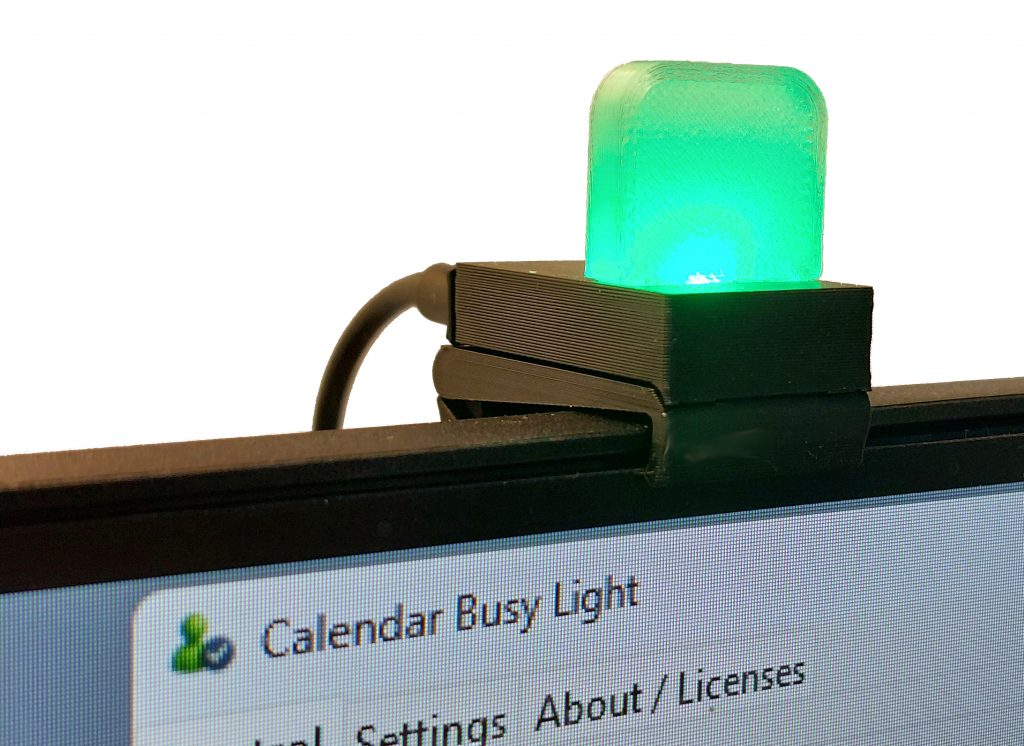
The Busy Light project is a local-only hardware and software build that connects a Windows Outlook calendar to a single WS2812/NeoPixel RGB LED using Python, serial communication, and an Arduino-compatible board. The goal is simple: make your availability visible at a glance, without needing cloud services, Teams integration, Azure, Microsoft Graph, or online tokens. (GitHub)
Why I Built This
When working at a desk, it is not always obvious to others whether you are available, in a meeting, focusing, or away. This project solves that problem with a small physical light that changes color based on the current Outlook calendar status.
It is especially useful for home offices, shared workspaces, workshops, or anywhere a clear “busy” indicator can help avoid interruptions.
How It Works
The system uses a Windows Python application to read the local Outlook calendar through Outlook COM. The Python app then sends color commands over a serial connection to an Arduino-compatible Pro Micro board, which controls a WS2812B addressable RGB LED. (GitHub)
The basic flow is:
Outlook Calendar → Python App → Serial Connection → Arduino → NeoPixel LED
By default, the light can show different states such as busy, upcoming busy, free, or out of office. These colors and behaviors are configurable in the app. (GitHub)
Key Features
- Local-only design with no cloud dependency
- Reads availability from the Windows Outlook calendar
- Uses a single WS2812/NeoPixel RGB LED
- Configurable colors, brightness, fade, blink, and working hours
- Manual mode and quick test buttons
- Heartbeat watchdog that turns the light off if the computer connection stops
- Serial auto-reconnect
- Settings saved locally in JSON
- Includes Arduino firmware, Python GUI software, electronics notes, and 3D-printable housing files (GitHub)
Hardware
The electronics are intentionally simple. The project is based around a Pro Micro 5 V / 16 MHz board and one WS2812B addressable RGB LED. The LED is mounted inside a small enclosure, with a diffuser/light guide to make the status color easy to see. (GitHub)
A USB-C or Micro-USB cable is used depending on the Pro Micro board selected.
3D-Printed Housing
The project also includes STEP files for a custom housing, including a light guide, mounting bracket, PCB case, and back cover. This makes the project more than just a breadboard prototype — it can become a clean, finished device suitable for daily use on a desk or monitor. (GitHub)
What I Like About This Project
The best part of this build is that it combines several useful DIY skills in one project:
- Python desktop automation
- Arduino firmware
- Serial communication
- Addressable RGB LEDs
- Basic electronics
- 3D printing and enclosure design
It is a small project, but it touches many areas of practical making.
Final Thoughts
The Busy Light is a useful and privacy-friendly DIY project for anyone who wants a visible status indicator based on their Outlook calendar. It is simple enough to understand, but complete enough to be genuinely useful in everyday work.
For makers who enjoy combining software, electronics, and 3D printing, this is a great example of how a small idea can become a polished and practical device.
Project link: Busy Light on GitHub (GitHub)